
Residual targets and convergence in Stokes
Stokes runs steady OpenFOAM 14 cases until they converge or reach an iteration limit, and it labels the result honestly. This page explains the two settings involved and how to read the residuals.
The two settings
- Residual target. A run stops as soon as the initial residual of every solved field (velocity components, pressure, energy, turbulence quantities) falls below the target. The default for a new project is 1e-3. You can change it in the solver settings in Full mode.
- Iterations. The maximum number of iterations, set on the Run card. The run stops there even if the residuals are still above the target.
Converged or not converged
When a run ends, the Run card and the status bar say which happened:
- Converged: every residual reached the target.
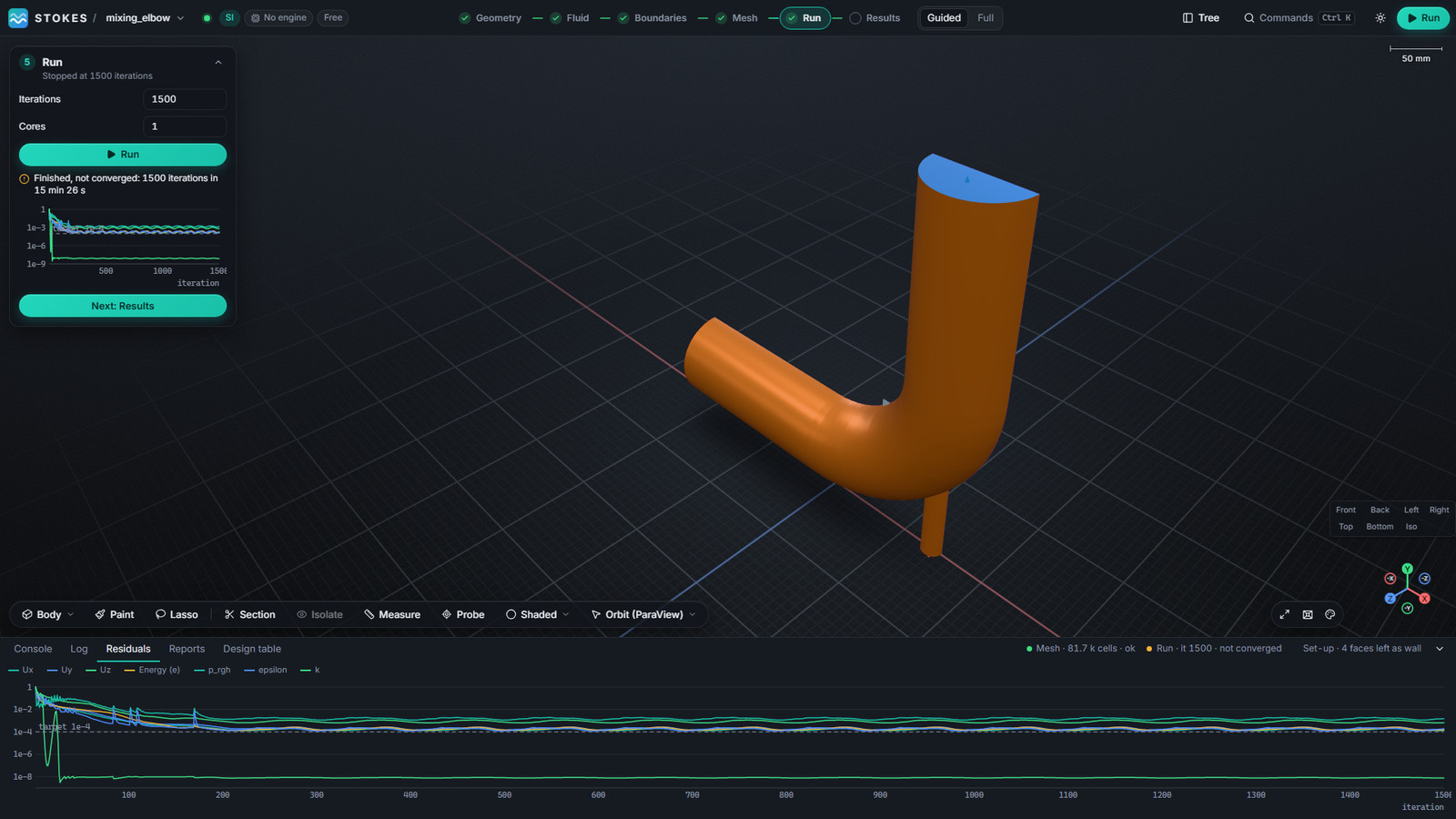
- Not converged: the run reached its iteration limit first. This is not a failure. The fields are written and you can look at them, but treat numbers from them with care until you have checked the quantities you care about.
- Failed: the solver stopped with an error. The Log tab in the bottom drawer shows the solver output.
Examples from the mixing elbow in the screenshots: one run converged in 161 iterations at the default 1e-3 target; another, with a tighter 1e-4 target, stopped at 1,500 iterations as not converged, with residuals oscillating just above the target.
Reading the residual chart
The Run card shows a small chart while the solver runs; the Residuals tab in the bottom drawer shows the full history with one line per field and the target drawn as a dashed line. Look for:
- A steady fall to the target: the run is converging.
- A flat line or a slow ripple above the target: the solution has settled as far as these settings allow. Check whether the quantities you care about (an outlet temperature, a pressure drop) still change. If they do not, the result may be usable; if they do, refine the mesh, change the schemes or run a transient case.
- A sudden rise or very large values: the run is diverging. Look at the mesh quality warnings on the Mesh card and at the boundary values.
Tips
- A tighter target is not always better: on a coarse mesh the residuals can level off above 1e-4. Decide what accuracy you need and check a monitored quantity.
- Start with a coarse mesh to check the set-up, then refine.
- Stop a long run with Stop; it keeps what it has, and you can resume it.
OPENFOAM® is a registered trade mark of OpenCFD Limited. Stokes is not approved or endorsed by OpenCFD Limited or the OpenFOAM Foundation.